Java While & do- While Loop

IIIT - N Software Geek. Startup Enthusiast. Build for the Future.
When we don't know how many times to return the condition then we need to go for a while loop.
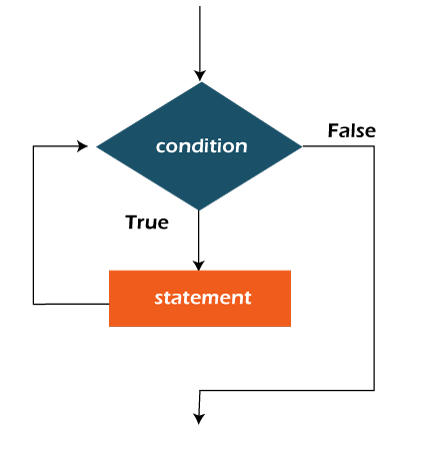
In the While loop, it will iterate until the specified condition is true.
whenever the condition becomes false then it automatically exits from the while condition.
while (condition){
    //code to be executed
    Increment / decrement statement
}
Flow chart of While Loop:
Example Program to print the first 5 numbers using while loop
public class Main{
    public static void main(String[] args){
        int num=0;
        while(num < 5){
            System.out.println("Number :" + num);
            num++;
        }
    }
}
Explanation:
Step 1: First we initialized the num variable as 0.
Step 2: In the while loop it will iterate until the condition becomes true.
Step 3: so it will check until num < 5 i.e, 0,1,2,3,4 which is true. whenever the condition 5 < 5 comes it becomes false and it will exit from the loop.
Step 4: For each iteration, we need to increment the num variable to process next. Otherwise, it will end up in an infinite loop.

Do-While Loop :
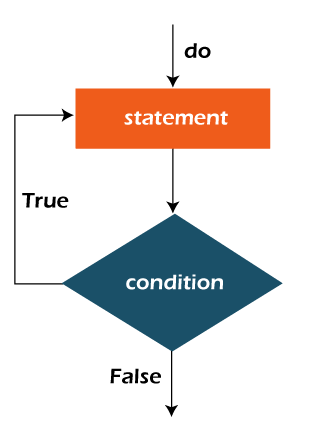
It is also helpful to iterate a part of the program repeatedly until the specified condition is true.
If we don't know how many times we need to iterate and you need to execute the loop at least one time then it's better to use the do-while loop.
//syntax for do-while loop
do{
    //statement to be executed
}while(condtion);
Flow chart for do-while Loop:
Example :
public class Main{
    public static void main(String[] args){
        int num=1;
        do{
            System.out.println("Number = " + num);
            num ++ ;
        }while(num<=10);
    }
}


